How Data and Behavior Continue After UI Generation
Seeing a renderer draw the UI only proves that generation and rendering are connected. The user will then switch tabs, select a city, fill in a form, or submit an order. Data on the server may also change independently and need to reach the client. Whether a GenUI framework can support a real product often depends on what happens after these actions. Following the previous chapter, this chapter compares how OpenUI and A2UI handle these cases using the same weather demos.
We will start with a few real clicks, then separate the problem into local state, business actions, and external data updates.
Question: Where Should a Click Go?
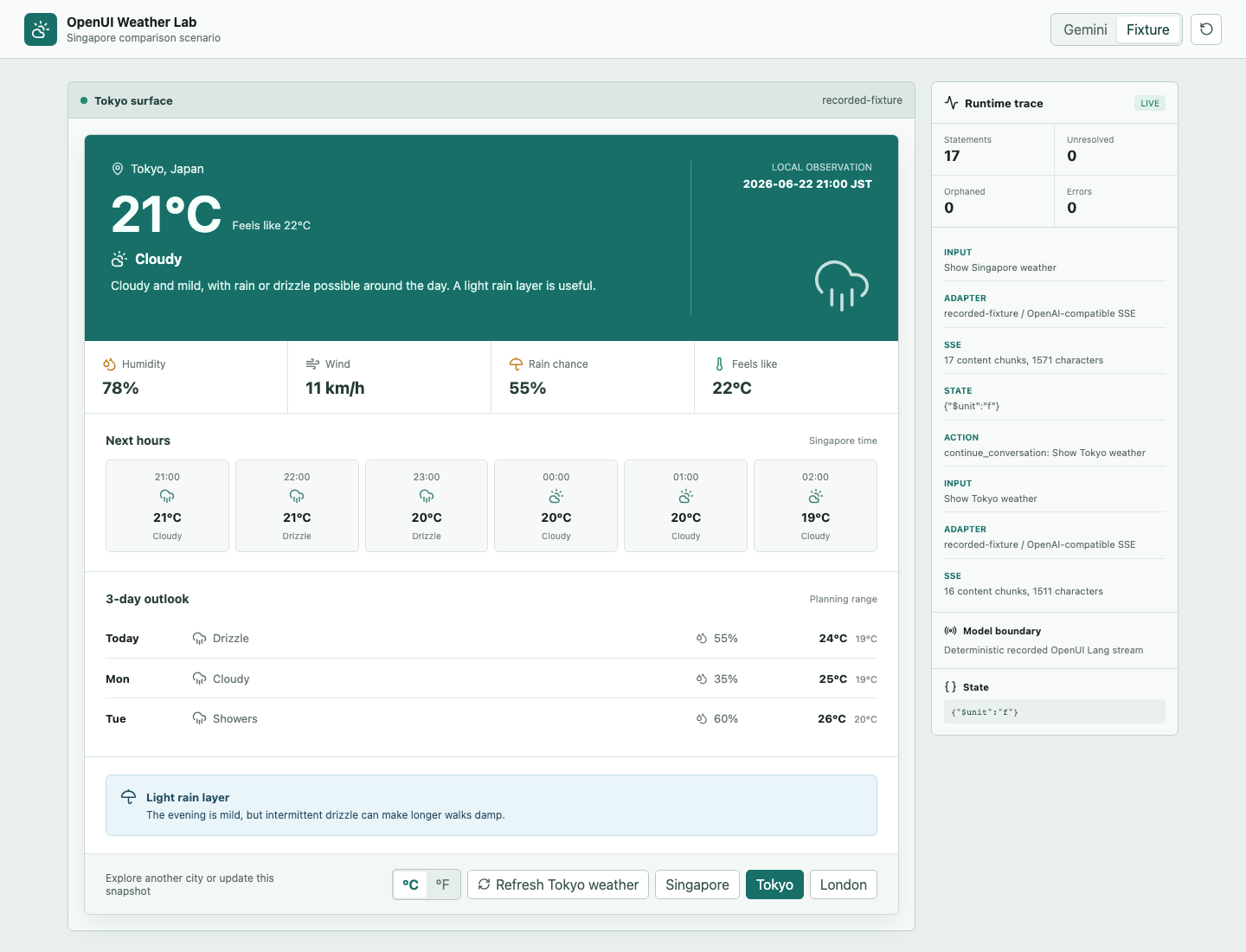
The OpenUI weather card contains two kinds of buttons. °C / °F changes the local $unit without a network request. Selecting Tokyo uses @ToAssistant("Show Tokyo weather") to return control to the host and request another OpenUI Lang response:
The London button in the A2UI weather card emits an action with a surfaceId, sourceComponentId, and city context. The Python server reads a new mock weather snapshot and returns an A2UI message. The Flutter Surface then shows London:
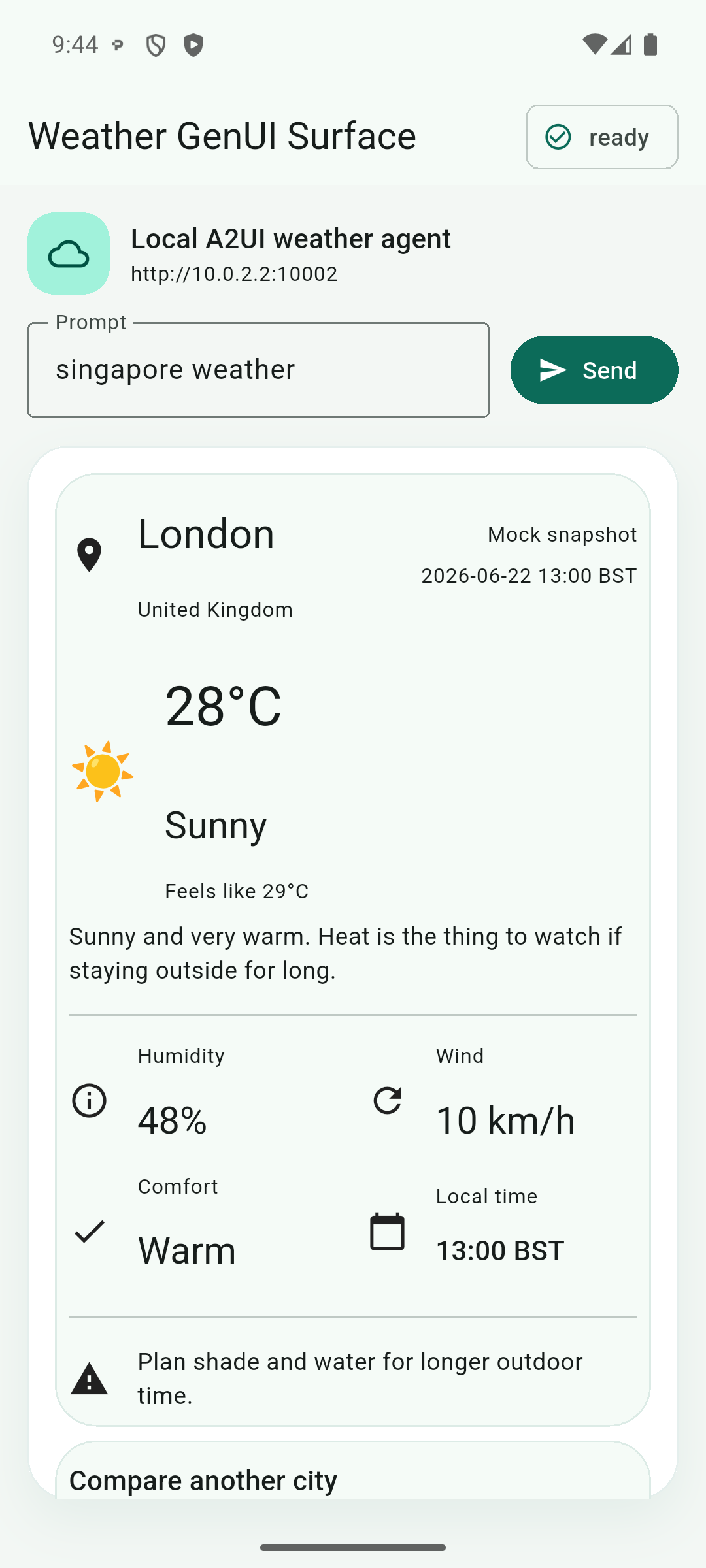
Both interactions look like "select a city," but their paths differ:
| Action | OpenUI weather demo | A2UI Flutter weather demo |
|---|---|---|
| Switch °C / °F | $unit plus a state field, handled inside the runtime | Local unit switching is not implemented in this demo |
| Select a city | @ToAssistant starts another UI response | An A2UI action returns to the server through A2A |
| Return the result | Regenerate the complete OpenUI program | Send only updateDataModel(path=/weather) and update 13 bindings |
| Renderer in this run | React state/runtime | Flutter SurfaceController |
Local State: OpenUI Store and A2UI Data Model
An OpenUI program can declare variables:
$unit = "c"
hero = WeatherHero(..., $unit)
units = UnitToggle("Temperature unit", $unit)
Clicking UnitToggle writes through its state field into the OpenUI runtime store. WeatherHero, HourlyForecast, and DailyForecast subscribe to the same $unit, so 26°C can change directly to 79°F. This interaction stays in the browser; neither the assistant nor the weather provider participates. The host can also observe and persist the state through onStateUpdate. OpenUI Lang provides @Set and @Reset for Actions that modify the same runtime state.
The experiment also exposed a state-lifetime detail. The user switches to °F and then selects Tokyo. The new OpenUI response declares $unit = "c" again, so the UI returns to Celsius, while the latest state snapshot in the host trace remains {"$unit":"f"}. Program declarations and host persistence are two separate layers. The application must decide whether a new response resets, merges, or hydrates state.
A2UI keeps state in the Surface Data Model. Component properties can bind to paths:
{
  "id": "temperatureText",
  "component": "Text",
  "text": { "path": "/weather/temperatureLabel" }
}
When a later updateDataModel changes /weather/temperatureLabel, native components subscribed to that path can rebuild. TextField values, selection, validation, and other interactions can also be organized around the Data Model. Clients may register functions for formatting or derived values.
The weather experiment later reuses this component tree, writes a London snapshot through the Data Model, and records payload size, rebuild behavior, and UI state.
Business Actions: The Model Does Not Need Every Click
OpenUI's @ToAssistant fits conversational actions such as "show another city," "explain this result," or "give me another set of options." It gives the host a human-friendly message, and the application decides how to start the next assistant response.
An actual Submit reservation request follows another path. OpenUI's Mutation() can register a tool supplied by the host, and a button executes it with @Run(mutationRef). The application can also handle custom behavior through onAction. Form values, user identity, inventory, and authorization go to a business API; the UI updates after that API returns success or failure. The model may help generate the explanation, while the business API decides whether the order is accepted.
An A2UI action is a domain event. The London action in this experiment contains:
{
  "action": {
    "name": "select_city",
    "surfaceId": "weather",
    "sourceComponentId": "londonButton",
    "context": { "city": "London" }
  }
}
The server can handle select_city directly or pass it to an agent. A2UI records which Surface and component emitted the action and what context it carries. Authorization, idempotency, business validation, and the final result still belong to the product backend. The surrounding agent runtime and business flow decide whether a button enters the LLM.
A controlled action flow usually separates three categories:
- UI state, such as tabs, expansion, and temporary selection, stays in the local runtime.
- Deterministic business actions, such as refresh, order submission, and approval, call an explicit tool or API.
- Intent continuations, such as changing the plan, explaining a result, or reorganizing the UI, return to the model or agent.
Sending every button back to the assistant adds latency and blurs business boundaries. Keeping all state inside components makes the next UI response harder to restore. Frameworks provide the expression mechanisms, while the application still chooses the correct execution layer for each action.
External Data: What Happens When Order Status Changes on Its Own?
Weather and orders share a common case: server data changes while the user does nothing. This case makes the runtime choices in OpenUI and A2UI easier to see.
OpenUI's Query() is executed by the host toolProvider. It can run automatically after streaming completes and may also specify a refresh interval:
order = Query("getOrder", {id: $orderId}, {status: "loading"}, 30)
refresh = Button("Refresh", Action([@Run(order)]))
If statusText binds to order.status, the runtime can call getOrder every 30 seconds and update the component without regenerating the layout. Polling works for low-frequency data with limited real-time requirements. Higher-frequency updates usually need push delivery or a more explicit invalidation policy.
@Run(order) actively invalidates and refetches the query. A change in state referenced by the query args also triggers another request. Products still need a query policy. For example, binding every keystroke in a search box directly to query args may issue one request per character. Debouncing, cancellation, caching, retries, and authorization remain responsibilities of the runtime and tool-provider side. OpenUI places the query in the UI program, while the business system continues to decide how requests should behave.
A2UI is closer to server-side state synchronization. The first response establishes a Surface and data bindings. When an order status changes, the server can send:
{
  "version": "v0.9",
  "updateDataModel": {
    "surfaceId": "order-detail",
    "path": "/status",
    "value": "shipped"
  }
}
This message can arrive through a persistent SSE, WebSocket, or A2A stream. An app may also poll on its own and pass the result into SurfaceController. A2UI defines the Surface update message. The surrounding runtime and product architecture decide where data comes from, whether transport stays connected, and how reconnection restores state.
When the component tree already binds to /status, a data update is enough. If the order adds a refund form or changes the structure of its delivery timeline, the server can send updateComponents. Separating the Data Model from component definitions makes this update granularity possible.
Reuse the Layout, Update the Data
Apply the same question to the weather demos: the UI has already been generated and rendered, and new data should continue using the existing layout. OpenUI keeps the same Renderer and Query program. A2UI keeps the same Surface and 66-component tree.
OpenUI: Query Reuses the Existing Renderer
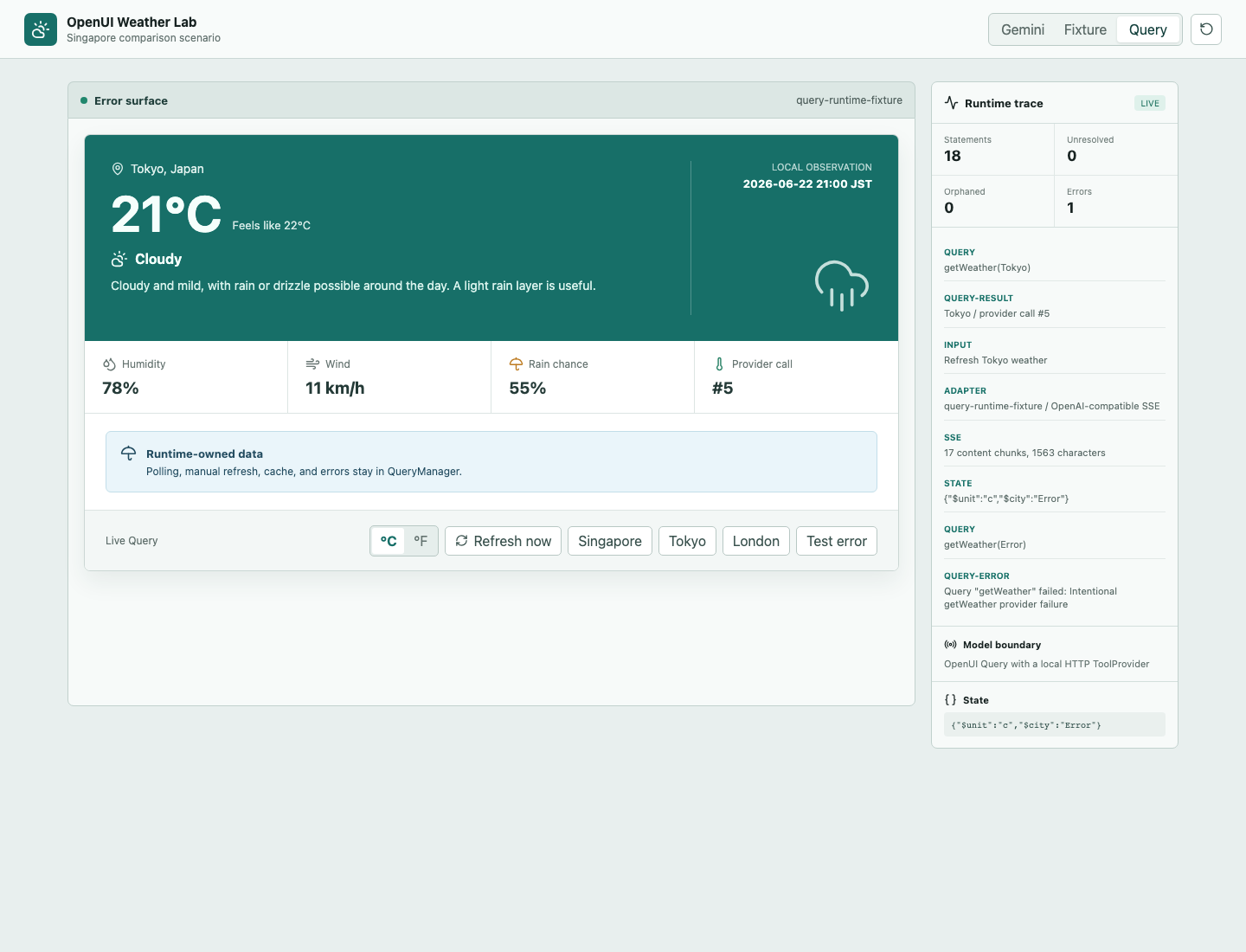
The OpenUI weather demo adds a Query mode backed by a real local HTTP toolProvider. With a two-second test interval, Query("getWeather", ...) covers automatic polling, manual refresh through @Run, and a Tokyo request after its city args change. Query cache and $city state survive when the same Renderer receives a new response. An intentional 503 becomes a tool-error, while the UI keeps the last Tokyo result. This cache lives in memory; restoring it after a page reload or Renderer unmount remains a host responsibility.
A2UI: The Data Model Updates the Existing Surface
The A2UI weather demo moves 13 weather text fields to /weather/... data bindings. The first response still establishes the Surface, Data Model, and 66-component tree. After the London action, the server sends only one updateDataModel(path=/weather) message. The wire payload drops from a full-resend baseline of 7,117 bytes to 654 bytes, a reduction of 90.8%.
Transport updates and renderer rebuilds need to be read separately. The Flutter runtime receives no component update event, while the /weather change still causes all 66 widget IDs to build again. In the accompanying runtime probe, the scroll offset stays at 632; focus, TextField State, and local input are also preserved. A2UI avoids resending the component contract, while the current Flutter renderer still performs a reactive rebuild.
These results line up with the mechanisms above. OpenUI Query keeps data requests, caching, and refresh in the Web runtime. An A2UI data patch leaves data synchronization to the surrounding transport and server, while the native renderer subscribes to the Data Model. Both paths reuse the UI structure that has already been generated. Further experiments can cover OpenUI retry and cancellation policies, plus A2UI leaf-patch frame time and cross-platform consistency.
Working Backward from Product-Market Fit
OpenUI puts parsing, state, expressions, Query/Mutation, and React rendering into the Web runtime. It fits temporary interactive content such as reports, filter forms, and explorable result cards inside chat. A team can publish its component library together with the Web service, while observing model output, browser runtime behavior, business data sources, and state restoration.
A2UI puts the Surface, Data Model, component registry, and action dispatch into the client runtime. It fits native multi-platform UI and longer-lived Agent Surfaces. The corresponding cost is maintaining catalogs and renderers across Android, iOS, Flutter, and Web. The capabilities of older clients also constrain what an agent may generate.
A Web product such as Thesys C1 can update its OpenUI runtime centrally, and users receive it on refresh. A native A2UI route such as the Flutter implementation usually follows the app release cycle.
Three scenarios help make the distinction concrete:
- A filterable report generated temporarily inside chat: Web is the primary platform, structure changes often, and OpenUI's composition plus Query/Mutation fit naturally.
- A mobile order detail screen receiving ongoing local-delivery status: native components, stable identity, and data patches matter, which fits A2UI's Surface and Data Model.
- A fixed weather card changing only a few values: both runtimes add substantial machinery; a predefined component plus an ordinary API is often faster to ship.