The GenUI Feature in Vercel AI SDK
After looking at OpenUI and A2UI, Vercel AI SDK UI feels like a clear drop in what is being generated. Vercel's current Generative UI capability is basically a direct mapping from the result of one tool call to one React component.
Take the weather demo in this chapter. In Vercel's flow, the model does not receive a component catalog, nor does it decide how many Row, Text, or Button elements a card should contain. It simply selects weather from the available tools and generates its query arguments. When the frontend sees the returned tool-weather part in the stream, it displays a weather card that has already been written.
This chapter summarizes the typical structure as:
Tool -> Semantic Component mappingSemantic Component is not an official AI SDK type. It is a term used in this chapter for components with complete business semantics, such as weather cards, stock cards, and order cards. Their layout, styling, and internal interactions already live in the application. Their granularity is much larger than primitives such as Card, Icon, and Text.
AI SDK does not force a one-to-one mapping between tools and components. A tool can render only text, and several tools can share a renderer. Still, the official tutorials and Vercel's own Chatbot use a direct pattern: each tool-${toolName} part is mapped in a frontend branch to a corresponding Semantic Component. Within the scope of this chapter, it is reasonable to treat this as an approximately one-to-one route.
From Tool to Semantic Component
We can examine the model side and the application side separately. The model receives the prompt, conversation history, and tool contract. In the local weather demo, the main input sent to the model adapter looks like this:
system: You are a concise weather assistant.
        Use the weather tool when the user asks for weather.

user:   Show Singapore weather

tool:   weather
        description: Display a rich weather card for a city.
        input: { city: string /* City name to look up. */ }
The input comes from the tool's Zod inputSchema. AI SDK converts it to JSON Schema before passing it to the model provider. The model can then produce:
weather({ city: "Singapore" })At this point, the model has finished making UI-related decisions. rich weather card is only a capability description in the tool definition. It does not tell the model where an icon should go, how large the temperature should be, or expose WeatherCard.tsx to the model.
The application side is ordinary React code:
if (part.type === 'tool-weather') {
  return (
    <WeatherCard
      input={part.input}
      output={part.output}
    />
  );
}
WeatherCard has fixed weather, location, temperature, humidity, and wind icons. Its top hero area, three metric columns, and bottom summary are also fixed. AI SDK sends the weather tool's input, output, and execution state to the browser. The card's appearance comes from application code.
An application could define its own renderUI tool and put a complete component tree into the input schema. That would extend the design toward primitive component composition. The application would then need to implement the catalog, schema, parser, and renderer itself, which amounts to rebuilding an A2UI/OpenUI-like system.
Core Interaction Structure
The UI expression is simple, but a tool call does not travel from the model to React as one plain JSON object. AI SDK adds a fairly complete state conversion layer across model messages, frontend messages, and streaming transport:
Browser input
  -> UIMessage
  -> ModelMessage + Tools
  -> streamText / ToolLoopAgent
  -> tool call
  -> tool execute
  -> tool result
  -> UIMessageChunk
  -> SSE
  -> useChat
  -> typed tool part
  -> Semantic Component

tool result
  -> next ModelMessage
  -> model continues with text or another tool call
As with A2UI, it helps to start with a few core objects:
Tool: a semantic capability exposed to the model. It mainly contains a name, description, input schema, and an optionalexecute()function. It describes what can be done, not the internal layout of a React component.ModelMessage: the messages that actually enter model context, including system instructions, user input, assistant tool calls, and tool results.UIMessage: the conversation state used by the frontend. In addition to text, it can contain reasoning, tool parts, custom data, and metadata.UIMessageChunk: a transport unit sent incrementally from the server to the browser, such astext-delta,reasoning-delta,tool-input-available,tool-output-available, or a custom data part.typed tool part: the frontend object produced afteruseChatmerges chunks. A static tool creates atool-${toolName}type, such astool-weather.useChat: consumes the UI message stream, merges individual chunks back intomessages, and triggers another render. Together with the transport and server-side resume mechanism, it can also continue an interrupted stream.
A typed tool part has states that the UI can consume directly:
input-streaming
input-available
output-available
output-error
approval-requested
The frontend can show a skeleton while arguments are still streaming, display a loading state while the tool runs, switch to a result card when output arrives, and render separate states for errors or approval requests. There are also states such as approval-responded and output-denied, which appear in the approval flow below. AI SDK has no A2UI-style Surface, Catalog, Data Model, or Action, but it turns the common tool execution lifecycle of a chat-like UI into frontend state that an application can consume.
Weather Card Demo
To inspect these intermediate artifacts, I built a local weather demo. The experiment uses [email protected] and @ai-sdk/[email protected]. Its model is a deterministic mock streaming model, so every run produces the same tool call and logs.
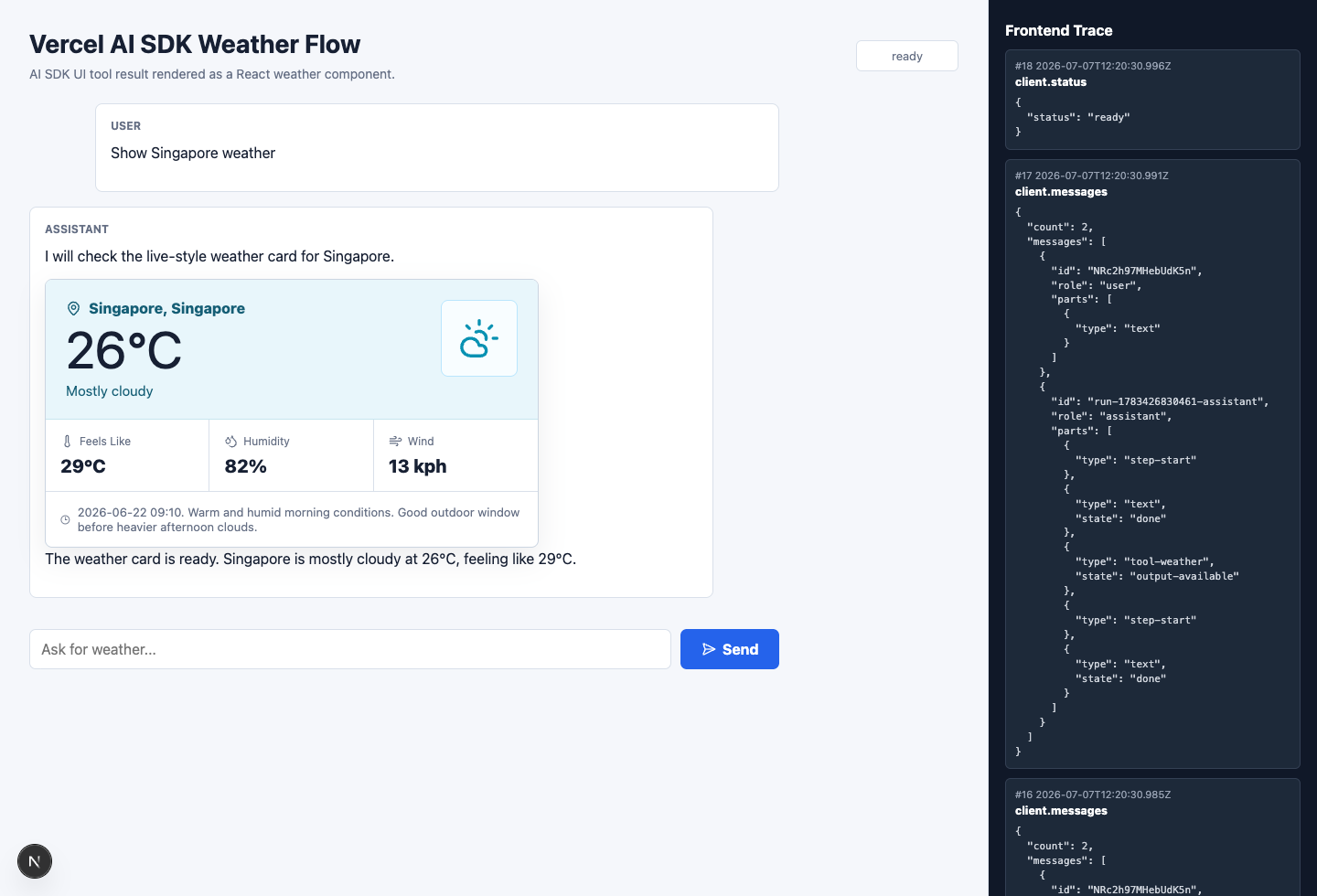
After the user enters Show Singapore weather, the browser first sends a UIMessage through useChat and DefaultChatTransport. The server converts it to ModelMessage, then gives it to ToolLoopAgent together with the weather tool.
The first stream from the local mock model produces one sentence and one tool call:
{
  "type": "tool-call",
  "toolName": "weather",
  "input": {
    "city": "Singapore"
  }
}
There is an important boundary to this experiment: the mock model has weather and Singapore hardcoded. It does not read the prompt and then select a tool. The experiment checks how a tool call enters the UI stream. It does not test whether a real model can reliably choose the correct tool.
weather.execute() is an async generator. It first yields a loading result, then returns the complete weather data:
async *execute({ city }) {
  yield {
    state: 'loading',
    city,
    message: `Fetching ${city} weather...`,
  };

  yield {
    state: 'ready',
    city: 'Singapore',
    temperatureC: 26,
    feelsLikeC: 29,
    humidity: 82,
    windKph: 13,
  };
}
AI SDK converts these model and tool stream parts into UI message chunks. The following excerpt shows the tool input, preliminary loading output, and final result arriving in order over the same SSE connection:
{"type":"tool-input-available","toolName":"weather","input":{"city":"Singapore"}}
{"type":"tool-output-available","output":{"state":"loading","city":"Singapore"},"preliminary":true}
{"type":"tool-output-available","output":{"state":"ready","city":"Singapore","temperatureC":26}}
useChat does not need to understand the weather domain. It only merges these chunks into one tool-weather part and triggers React renders as the state moves through input-available and output-available. The page recognizes tool-weather, then passes its input and output to WeatherCard.
The tool result is also placed into the next ModelMessage. The model now knows that Singapore is 26 degrees Celsius. It can add a short summary or call another tool based on the result. One result has two consumers here: React uses it to draw the card, while the model uses it to continue the current agent loop.
Vercel's official weather example uses the same organization. It defines a displayWeather tool that returns a location, weather condition, and temperature. When the frontend sees tool-displayWeather, it manually renders <Weather {...part.output} />. Vercel's open-source Chatbot likewise maps getWeather output to a prewritten <Weather /> component. Change the data fields and the component styling, and the flow remains much the same.
How Buttons Continue the Flow
The official examples commonly show confirmation and approval interactions, but they live at different levels in the SDK. Approval is a built-in state in the tool lifecycle. When a server-side tool requests approval, the frontend receives approval-requested. A button sends the user's decision through addToolApprovalResponse(). Approval allows the original tool to run, while rejection ends in output-denied.
Confirmation is not another built-in action. The official askForConfirmation example is a custom client-side tool without an execute() function. The model calls it first. The application renders confirmation buttons in a prewritten React component, then uses addToolOutput() to write the user's choice back to that tool call.
askForConfirmation -> input-available -> user clicks a button
  -> addToolOutput() -> output-available -> next model call

server tool -> approval-requested -> user approves or denies
  -> addToolApprovalResponse() -> run original tool / output-denied
Other custom button behavior must also be written into the corresponding Semantic Component ahead of time. A button can update local state, call a business API, start a new conversation turn through sendMessage(), or complete the current tool call through the APIs above. The application must configure an automatic submission condition or call sendMessage() manually before the model continues. On the next turn, the model receives the tool result or approval response and decides whether to call another tool. The new typed tool part is again mapped by the frontend to a prewritten component.
The Engineering Value of Simplicity
There is not much to investigate in the UI expression layer of this route. The model generates a tool call. Primitive component structure, data binding, and local UI updates never become a separate protocol. AI SDK does, however, collect a set of tedious connections between agents and frontends into one message stream.
Text, reasoning, tool input, tool output, custom data, and metadata can travel to the browser over the same stream. useChat incrementally merges message parts and lets React render the latest state. With persistence, transport, and resume APIs, an application does not need a separate streaming protocol for every content type.
Integration cost is also low. An existing Web product only needs to add a tool and a predefined component, then pass the output to that component to display the agent result in the conversation as predefined UI.